- ComplianceForge moved to a new website and billing system on July 1, 2026.
- Your account is now the customer portal at billing.complianceforge.com/portal/complianceforge.
- Order history, invoices, receipts and payment records all carried over.
- Logins from the previous store were not migrated and cannot be recovered.
- Download links issued before the migration have expired. They were always temporary.
- Purchased documentation is delivered by email and is not stored in the portal.
What Changed On July 1, 2026
We rebuilt the ComplianceForge website and moved order management, invoicing and account records onto a new billing platform. The reason was straightforward. Customers needed a real self-service account, meaning one place to see order history, download invoices and receipts, review and accept quotes, and pull account statements without emailing us for a copy of each document.
Your purchase records came with us. Orders placed before the migration sit in the portal alongside anything purchased since.
Three things did not carry over, and between them they account for nearly every question we receive about the change: your login credentials, your download links, and the appearance of the account area itself.
Why Doesn't My Old Login Work?
Account logins from the previous store were not migrated to the new billing system. Setting a password on the old store does not grant access to the new customer portal, and an old password cannot be recovered, because that system is no longer in use.
What you do next depends on when you bought from us.
Step by step instructions for both routes are in How Do I Get Access To My Customer Portal?
Why Did My Download Links Expire?
This is not a side effect of the migration. ComplianceForge download links have always been temporary, issued with an expiration date rather than left live indefinitely, and every link issued before July 1, 2026 has now passed that date.
If you need your documentation again we will re-issue a link. You will receive the version you originally purchased rather than the current release. See Where Do I Download The Documentation I Purchased?
What Does The Portal Do Now?
Once you are signed in at billing.complianceforge.com/portal/complianceforge, the menu on the left gives you the following.
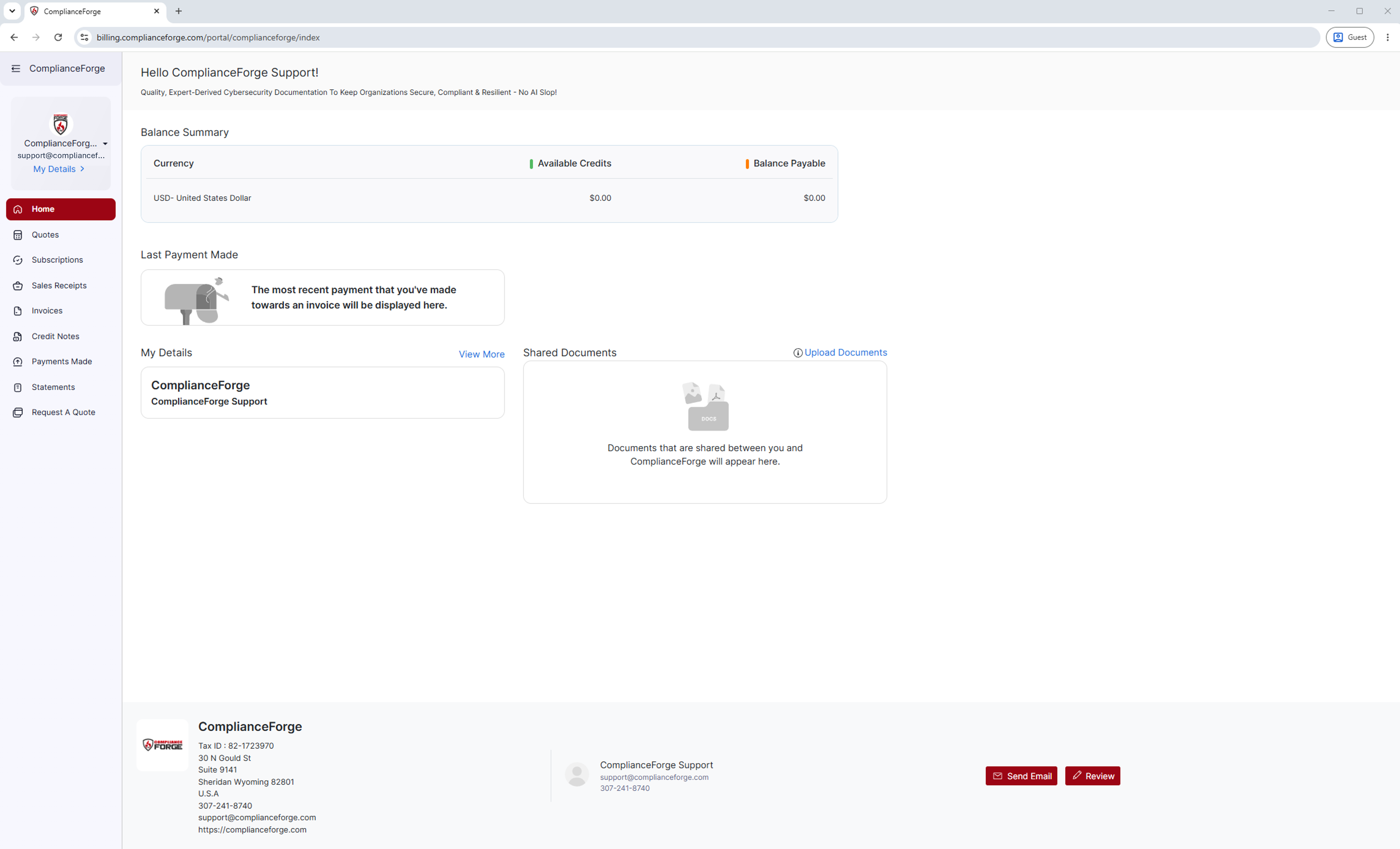
Home
You will be able to view a your balance summary, your most recent payment, and your account details at a glance.
Quotes
You will be able to request new quotes, review and accept open quotes, and view any historical quotes you make.
Subscriptions
If you purchased a subscription, you will be able to see live subscriptions for the associated product here and know exactly when they expire.
Sales Receipts
You will be able to view all sales receipts made from your account and download them whenever your finance team asks for either.
Invoices
You will be able to view every new or historical invoice on your account, check if they are paid or closed, and download whenever your finance team asks for one.
Credit Notes
You will be able to view any credit notes associated with your account and download whenever your finance team asks for one.
Payments Made
You will be able to view a full payment history made from your account, which you can download themwhenever your finance team asks for payment information.
Statements
You will be able to a full statement of accounts, which you can filter by date and download as a PDF.
Request A Quote
You will be able to directly request a quote from the portal without needing to leave.
My Details
You will be able to update your personal details and view who else is listed as additional contacts and are associated with your company's account.
Some of these sections will be empty depending on what is on your account. An empty Subscriptions, Credit Notes or Sales Receipts tab means there is no record of that type on your account. It does not mean something is missing. If you believe a record should be there and it is not, contact support@complianceforge.com.
The portal holds invoices, receipts, quotes, credit notes and statements. It does not hold the documentation you purchased. Those files are delivered by email as a secure download link. Where Do I Download The Documentation I Purchased? explains why, and how to have them re-sent.
Contact ComplianceForge
If you have any questions regarding ComplianceForge's products or are curious about any of the content on our site, please feel free to contact us, and we are happy to help! If you want to add account administrators for product notifications, you can manage account contacts here.
You can contact us by pressing the button below to direct you to our contact form, or you can contact us at:
- Phone: +1-307-241-8740
- Email: support@complianceforge.com
Frequently Asked Questions (FAQs)
Here are answers to common questions about the updated customer account: